Pegfinity Controls and Aiming
Charge, release, and stop treating the power meter as the whole game.
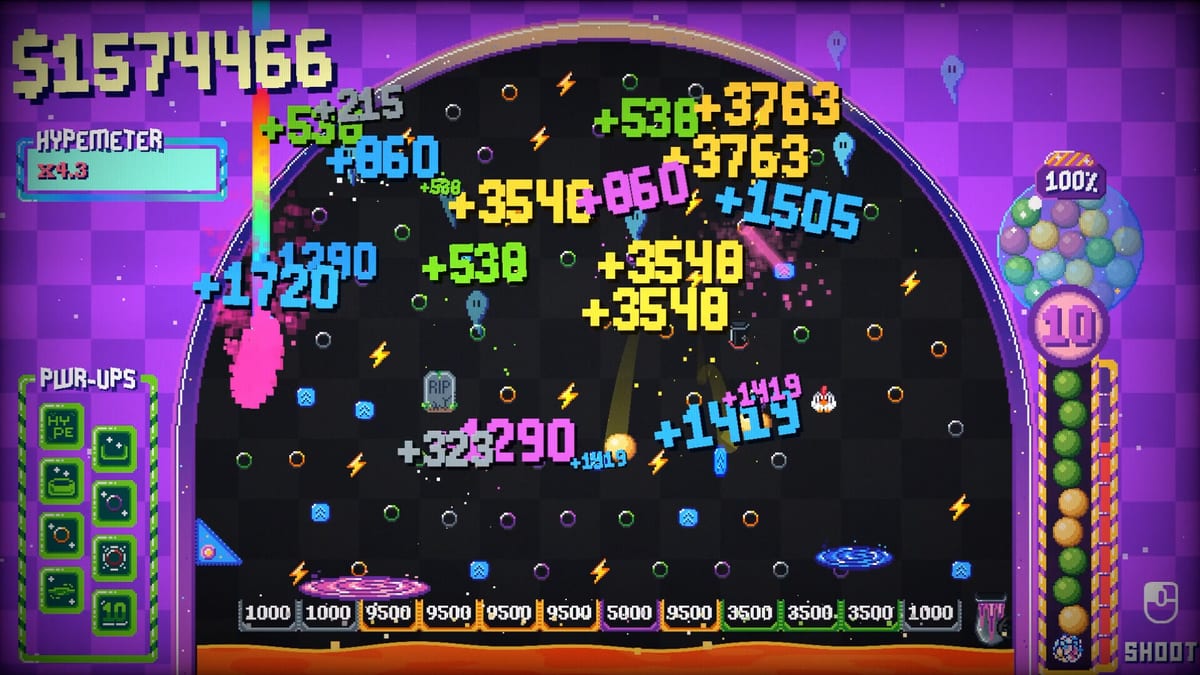
Pegfinity looks like a one-button toy, and on Steam Deck it almost is. On desktop the loop is still simple: move the launcher, hold to fill a power meter, release to fire. The complaints on the Steam page are not about missing keybinds. They are about where your eyes go. Several launch-week reviews say they spent most of a session staring at a small meter in the corner instead of the cascading board. This guide is how to aim well enough that the spectacle stays in the centre of the screen.
If you have not learned the economy yet, read How to Play Pegfinity first. If you already know you want combos more than snipes, jump to the Hypemeter guide.
Default inputs
On mouse and keyboard you aim with the mouse and fire with left click. Hold to charge, release to shoot. There is no separate jump, dash, or reload. After a ball leaves the launcher you do not steer it. Physics, pegs, and gadgets own the bounce. That is why charge timing matters more than twitch tracking. A consistent mid-to-high charge that clips the upper pegs beats a perfect snipe you can only land once every ten shots.
Steam Deck and other handhelds map the same hold-to-fire idea onto a trigger or mouse-emulated trackpad. Demo players on itch.io said the loop felt nicer on Deck than on a desktop monitor because you are not fighting a tiny corner widget with a mouse. If the meter still steals focus, sit further from the screen or use a larger UI scale if the build exposes one. Fragment Ventures has not published a full bind list; treat anything beyond click-and-hold as unverified.
How the power meter actually works
Think of the meter as a golf swing, not a sniper scope. Too little power dumps the ball into the first row. Too much slams it into a wall and kills the cascade. The useful band is a repeatable charge you can start during the previous ball’s bounce. Launch-week reviews asked for an auto-launcher because the optimal play became: watch the right side of the UI, release on cooldown, never look at the toys you bought. Steam patch 1.2.3 answers part of that: charge to maximum and the ball auto-launches, the bar resets after the shot, and a charge sound exists so you can listen instead of stare. That is a cap, not an idle gadget. You can still release early. Practise charging without looking. Use the board’s motion as the metronome. When the last ball is mid-fall, start the next hold. Let max charge fire if you are watching a cascade. Full patch list: Steam patch notes.
Top-row shots are the other half. Pegfinity boards are relatively wide and short compared with classic pachinko. A ball that enters low has fewer pegs to visit. A ball that kisses the top row falls through more collisions, more special pegs, and more chances to feed a portal or cactus. You do not need to hit a specific cactus every time. You need height.
What not to do
Do not wait for a perfect angle while the queue sits idle. Cash per minute beats a cinematic miss. Do not spam click before the cooldown; some reviews note the game does not buffer a press, so early clicks waste time. Do not spend a whole run fishing for one treasure chest if your pegs already print money — chests are nice, they are not the win condition. Do not enable every flashing background if you are sensitive to strobe. The accessibility patch adds toggles to disable background pattern movement and the blinking pulse light. Use them. Disco, firework, and bomb effects on the board can still flash. Setup notes: systems.
Aiming once gadgets exist
After Cactus, UFO, laser, or portal come online, aiming changes job. You are no longer trying to hit every peg yourself. You are trying to wake the machine. A single cactus spine, a UFO beam, or a laser chain can finish a board while you only launch to keep the system alive. The gadgets guide and synergy recipes list those loops. Your aim goal becomes: hit the activator, then fire just often enough that the round does not end. Max-charge auto-launch from 1.2.3 helps here: fill the meter while the machine runs, and the next ball leaves without a perfect click. The skill expression still moves from aim to upgrade order, which is why this wiki puts so much weight on the upgrade tier list.
Steam Deck and accessibility
Pegfinity is a short, one-button incremental. It runs at low spec — Windows 10, dual-core, 4 GB RAM, 500 MB disk — so handhelds are in the intended audience even if Steam Deck verification is unofficial. Use a comfortable trigger pull, keep the device from overheating during long chain reactions, and remember there is no confirmed cloud save at launch. If you switch between PC and Deck, assume local saves only until Fragment Ventures says otherwise. More platform notes live on platforms.
If aiming still feels like the whole game after an hour, you are probably under-upgraded. Buy peg density and Hypemeter, then come back. The meter shrinks in importance once the board fights for you.
Frequently Asked Questions
Quick answers players ask after the Steam launch.
What is the fire button in Pegfinity?
Left click on desktop: hold to charge, release to shoot. Steam Deck uses the same hold-to-fire idea on a trigger. There is no post-launch steering.
Why do reviews mention staring at the power meter?
The meter is small and sits off to the side. Practise charging without looking, prefer top-row shots, and let 1.2.3 auto-fire at max charge. It is a cap, not an idle gadget — patch notes.
Can I play Pegfinity on Steam Deck?
Demo and launch players report it works well as a one-button game. See platforms for setup notes. Cloud save is not confirmed.
Does better aiming beat better upgrades?
Early, yes. After special pegs exist, upgrade order matters more. Follow how to complete the tree once Cactus or UFO is online.